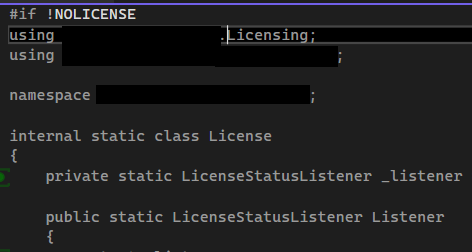
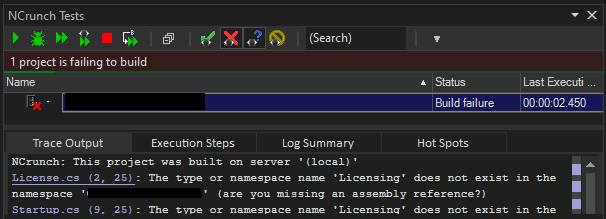
We have a solution with three configurations: Debug, Release, NoLicense. NoLicense is a release build with all licensing code removed using preprocessor directives.
NCrunch works fine when the project is in Debug or Release, but fails to build in NoLicense. The project builds fine in Visual Studio. Any idea on how to fix this or where to look?
When you switch between build configurations, how are you handling this in NCrunch? Do you use the 'Use Build Configuration' setting? Note that NCrunch doesn't track the selected build configuration in the IDE - it will always use the project's default configuration.
In the NCrunch Configuation, "Use build configuration" is set to empty. In the project file, we start with Debug. I believe the first one is the default?
The actual default depends on how the project is designed. I suspect you're encountering a variation of this problem, though I find the symptoms a bit strange and it makes me wonder if perhaps you have other build logic or package references dependent on the configuration.
Try setting NCrunch's 'Use Build Configuration' to 'NoLicense' to see if this makes any difference for you.
Setting 'Use build configuration' to NoLicense helped it get further into the build. I then had to add NCrunch conditionals to some post-build tasks and then it compiled!
Does that mean that NCrunch tries to build the Debug config, but Visual Studio only activates the NoLicense code?
cadbooster wrote:
Does that mean that NCrunch tries to build the Debug config, but Visual Studio only activates the NoLicense code?
Sort of. In this case it's most probably an inconsistency between the dependency data from Visual Studio (project.assets.json) and the build configuration.
I expect VS would likely set up its dependency data according to the selected build configuration in the IDE. NCrunch relies on this data to be fed downstream because it can't safely generate it itself. When you have dependencies from one build configuration being fed into a build system running on a different build configuration, weird stuff can happen.
Try to keep your NCrunch build configuration identical to the one selected in VS. If you continue to have problems, I recommend adjusting your logic so that your dependencies are the same between configurations but your code is different (i.e. use compiler conditionals instead of build conditions).
Got it. I'll keep the build conditions for now because I need to keep the license package out of the build at any cost. But now I know how to get the NoLicense configuration to build, so I can check that manually from time to time.